
输入框景背景透明:
<input style="background:transparent;border:1px solid #ffffff">
鼠标划过输入框,输入框背景色变色:
<INPUT value="Type here" NAME="user_pass" TYPE="text" SIZE="29" onmouseover="this.style.borderColor='black';this.style.backgroundColor='plum'"
style="width: 106; height: 21"
onmouseout="this.style.borderColor='black';this.style.backgroundColor='#ffffff'" style="border-width:1px;border-color=black">
输入字时输入框边框闪烁(边框为小方型):
<Script Language="JavaScript">
function borderColor(){
if(self['oText'].style.borderColor=='red'){
self['oText'].style.borderColor = 'yellow';
}else{
self['oText'].style.borderColor = 'red';
}
oTime = setTimeout('borderColor()',400);
}
</Script>
<input type="text" id="oText" style="border:5px dotted red;color:red" onfocus="borderColor(this);" onblur="clearTimeout(oTime);">
输入字时输入框边框闪烁(边框为虚线):
<style>
#oText{border:1px dotted #ff0000;ryo:expression(onfocus=function light (){with(document.all.oText){style.borderColor=(style.borderColor=="#ffee00"?"#ff0000":"#ffee00");timer=setTimeout(light,500);}},onblur=function(){this.style.borderColor="#ff0000";clearTimeout(timer)})};
</style>
<input type="text" id="oText">
自动横向廷伸的输入框:
<input type="text" style="huerreson:expression(this.width=this.scrollWidth)" value="abcdefghijk">
自动向下廷伸的文本框:
<textarea name="content" rows="6" cols="80" onpropertychange="if(this.scrollHeight>80) this.style.posHeight=this.scrollHeight+5">输入几个回车试试</textarea>
只有下划线的文本框:
<input style="border:0;border-bottom:1 solid black;background:;">
软件序列号式的输入框:
<script for="T" event="onkeyup">
if(value.length==3)document.all[event.srcElement.sourceIndex+1].select();
</script>
<input name="T" size="5" maxlength="3">—<input name="T" size="5" maxlength="3">—<input name="T" size="5" maxlength="3">—<input name="T" size="5" maxlength="3">—<input name="T" size="5" maxlength="3">—<input name="T7" size="5" maxlength="3">
软件序列号式的输入框(完整版):
<script for="T" event="onkeyup">if(value.length==maxLength)document.all[event.srcElement.sourceIndex+1].focus();</script>
<script for="T" event="onfocus">select();</script>
<script for="Submit" event="onclick">
var sn=new Array();
for(i=0;i<T.length;i++)
sn=T.value;
alert(sn.join("—"));
</script>
<input name="T" size="5" maxlength="3">—<input name="T" size="5" maxlength="3">—<input name="T" size="5" maxlength="3">—<input name="T" size="5" maxlength="3">—<input name="T" size="5" maxlength="3">—<input name="T" size="5" maxlength="3">
<input type="submit" name="Submit">
上一篇:HTML5布局标签属性和方法
 前几天有位站长朋友咨询了免费空间小编,问到2G流量的免费空间,能承受多大的访问量?也许有很多站长都不是很明2G流量到底是多少,下面小编给大家分析一下:
 最近有很多朋友咨询免费空间小编,问到了怎么注册免费邮箱呢?下面小编就跟大家一起分享一下: 免费邮箱有mail.163.com mail.qq.com mail....
 一、Windows Azure虚拟机Linux和Windows建站 1、Windows Azure中国目前开放免费试用,参考这篇文章申请和激活:中国版Windo...
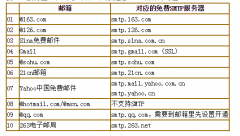 SMTP是简单邮件传输协议(SimpleMailTransferProtocol)的简称,是您发送Email所必须用到的。常用的免费SMTP服务器如下,用户名和...
 使用方法:[假设您的域名为:domain.com,您的邮箱为yoursname@yoursdomain.com]1.请下载并安装最新 Foxmail 最新版本,...